RELEASE NOTES
25 February 2026
COMUNITY PLATFORM
Platform Operations
API GATEWAY
New Features
- Introduced Azure API Gateway integration as a first-class platform capability, providing a governed entry point for API publishing, routing, and policy enforcement.
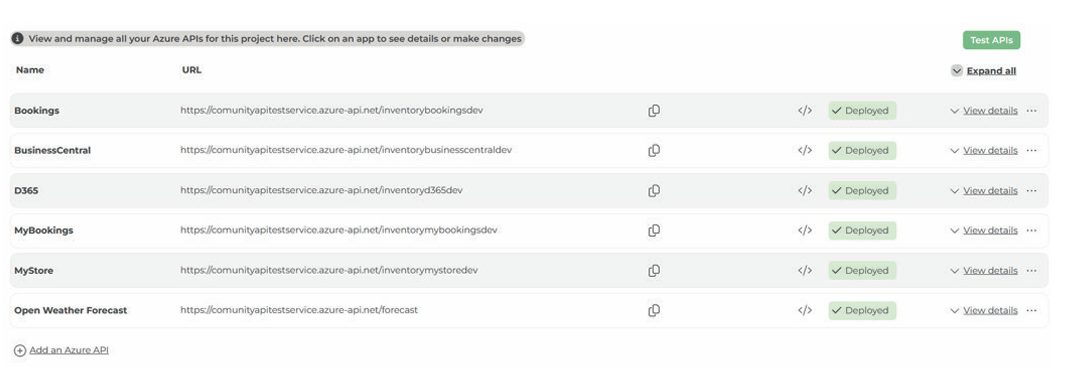
Figure 1: New API Management capability in ComUnity Platform
- Added support for persistent storage within the observability stack to retain critical telemetry data safely across restarts and upgrades.
Enhancements
- Implemented a Platform Integration Handler pattern to centralize how inbound/outbound integrations are authenticated, validated, routed, and ob served—improving consistency across services.
- Added an Observability Filter for API Gateway traffic so key requests automatically emit standardized telemetry (logs/traces/metrics), making trouble shooting and performance analysis significantly faster
OBSERVABILITY
New Features
- Added support for persistent storage within the observability stack to retain critical telemetry data safely across restarts and upgrades.
- Enabled new-environment observability baseline so fresh deployments can be instrumented with a consistent “minimum viable observability” setup from day one.
Enhancements
- Implemented Exemplar-based Trace ID extraction, allowing metric-to-trace linking so architects/operators can move from “a metric spike” to the exact trace data with far less effort.
- Introduced Azure Container Apps support for the observability architecture to improve portability and operational efficiency (scaling, lifecycle management, and infrastructure simplification).
- Implemented Tempo as part of the tracing architecture to improve trace storage/querying at scale and reduce the operational burden of trace management.
- Added IaC-based deployment for the observability stack, improving repeatability and reducing drift between environments.
- Resized key Observability VMs to better align compute with workload demand — improving platform stability under load and reducing avoidable cost/over-provisioning.
OPERATIONS
Enhancements
- Implemented Web Push notifications for the platform experience (Polymer UI), enabling operational and user events to reach users in-browser without requiring polling.
Bug Fixes
- Improved the reliability of Web Push notification delivery through additional validation/testing coverage, reducing intermittent delivery failures.
PLATFORM CORE
Bug Fixes
- Corrected the Logic App provisioning flow so new Logic App deployments reliably return a callback URL immediately after creation (removing manual retrieval steps and reducing setup friction).
- Added a robust mechanism to retrieve an Azure Logic App callback URL when required after deployment — improving operational continuity during redeployments or environment restores.
Platform Developer Toolkit
CENTRALIZED CONFIGURATION (CONFIG HUB)
New Features
- Added Config Hub tooling for Azure Logic Apps, enabling operators to manage Logic App configuration through a consistent, platform-governed configuration surface
AZURE LOGIC APPS
New Features
- Introduced end-to-end Logic Apps management in the Platform Toolkit, including core screens for viewing, configuring, and administering Logic Apps within a project context
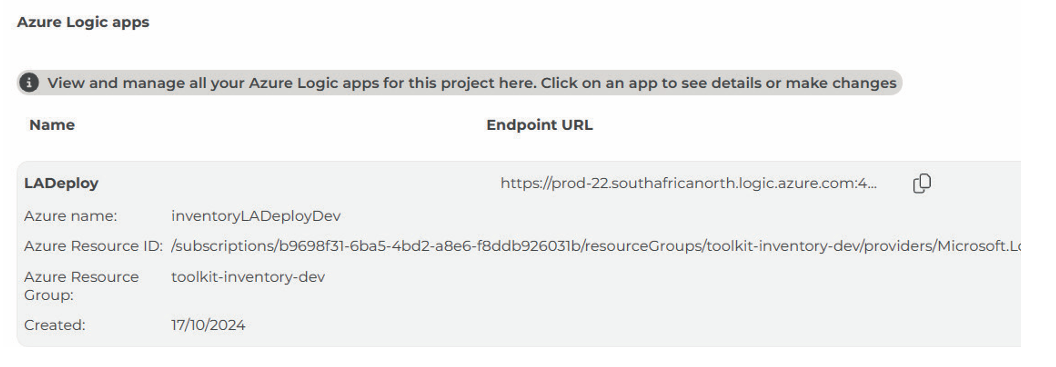
Figure 2: Manage Logic Apps in the ComUnity Platform
- Added deployment screens and workflows for Logic Apps so teams can manage deployment-related settings and actions directly from the Toolkit
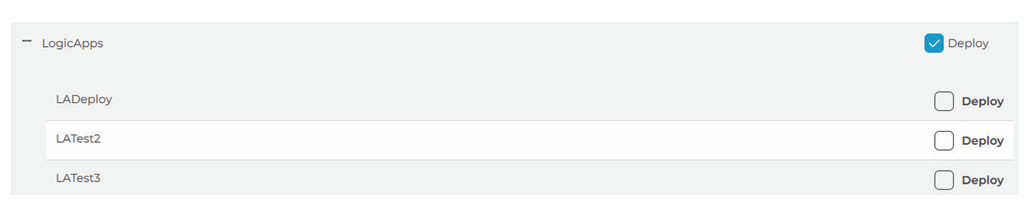
Figure 3: Manage deployment of Logic Apps
- Implemented Azure resource deployment support for Logic Apps from within the Toolkit, reducing the gap between configuration and real infrastructure provisioning.
- Added Toolkit role support for Azure resource administration to ensure only appropriately privileged users can manage Logic Apps and related Azure resources
Enhancements
- Implemented the underlying Logic Apps data model and entity controllers, enabling consistent CRUD behaviour and predictable API interactions across toolkit and platform services
- Added ToolkitCore API integration for Logic Apps to ensure UI actions map cleanly onto platform service capabilities (including repeatable behaviour across environments).
- Introduced tabbed settings UI for Logic Apps to reduce configuration complexity and make operational settings easier to navigate.
- Enhanced the Toolkit application navigation (including sidebar improvements) to make Logic Apps management easier to discover and faster to use.
- Added code snippet configuration UI support to streamline how teams manage reusable Logic App snippets/patterns within the platform’s operational tooling.
- Implemented Logic App delete in Core Deployment to ensure de-provisioning is complete and consistent (reducing orphaned resources and mismatched platform state)..
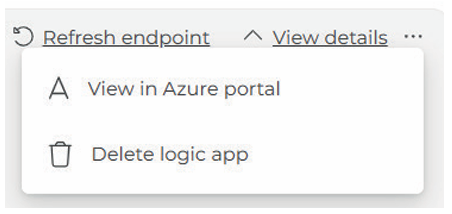
Figure 4: Delete flow for Logic Apps
AZURE FUNCTION APPS
Enhancements
- Added a Toolkit deployment screen for Azure Function Apps, improving operator visibility and making deployment actions more structured and repeatable
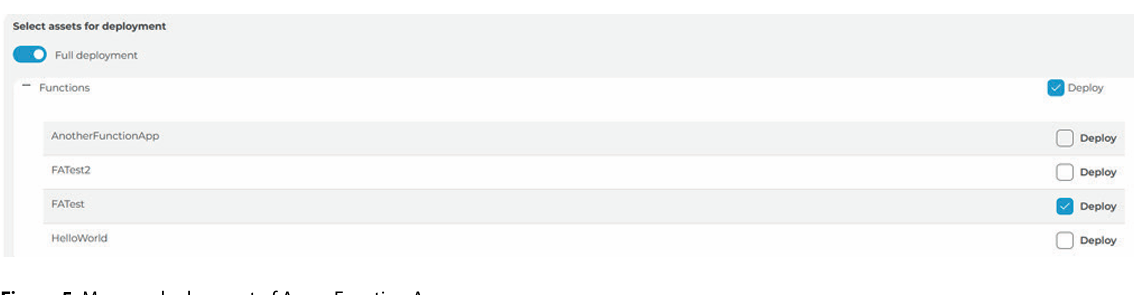
Figure 5: Manage deployment of Azure Fucntion Apps
- Added a mechanism for users to compare configuration changes before applying them to Function Apps—reducing accidental misconfiguration across environments.
DEVELOPER EXPERIENCE
Enhancements
- Improved Events/Alerts UI behaviour so operators can interpret and act on operational signals more efficiently (better clarity in event presentation and operational navigation)
ONBOARDING & DEVELOPER ENABLEMENT
Additional Changes
- Updated Toolkit onboarding guidance to reduce friction for new teams adopting the Toolkit.
- Expanded onboarding coverage for Toolkit + Communications Service setup so platform capabilities can be enabled in a more predictable sequence.
- Added onboarding notes for Platform setup and local development environment setup, improving developer ramp-up and reducing “first environment” setup issues
 Print document
 View document